Voices for a more playful world.

Giggle Pig is a free AI voice changer and soundboard for Windows. It runs on your own PC, on any NVIDIA, AMD or Intel graphics card, and works in any game or app that uses a Windows microphone: Discord, OBS, Steam and PC VR. Switch voices and fire off clips with a hotkey, or just say "Hey Giggle Pig".

Windows 10 and 11 · Free plan, no account needed

  • Runs locally
  • Any DirectX 12 GPU
  • Works offline
  • No account required
The Giggle Pig home screen: live as the Male voice, with quick voice switching and a list of soundboard clips

Works anywhere your mic does

  • Any PC game
  • Discord
  • OBS
  • Steam
  • Quest Link / Air Link
  • Virtual Desktop
  • SteamVR

Through the Giggle Pig virtual microphone. No game files touched.

AI voices

Real-time AI voice changer. On your GPU, not someone's server.

Pick a voice and talk. Giggle Pig converts your mic on your own PC and sends it to a virtual microphone your game hears. It runs on any DirectX 12 graphics card (NVIDIA, AMD or Intel) and falls back to your CPU if it has to.

  • Male and Female AI voices free; all 5 AI voices and 13 effects with Pro (18 in all), plus voices you import
  • Auto pitch matching fits each voice to your natural pitch
  • "Normal voice" and instant mute are always one click or hotkey away
Giggle Pig voice list: AI voices Female, Male, Natural Bright, Natural Deep and Natural Warm, plus your own trained and imported voices

Classic effects

Robot. Demon. Chipmunk. And 10 more.

Not every bit needs AI. The classic effects are light on your PC and instantly recognisable: Giant, Baby, Higher, Deeper, Alien, Radio, Megaphone, Whisper, 8-bit and Cave. Add pitch on top.

Robot, Demon and Chipmunk are free; the other 10 come with Pro.

  • Robot
  • Demon
  • Chipmunk
  • Giant
  • Baby
  • Higher
  • Deeper
  • Alien
  • Radio
  • Megaphone
  • Whisper
  • 8-bit
  • Cave

Soundboard

Mouse 4 is now an air horn.

A soundboard with real gamer hotkeys. Drop in mp3, wav, ogg, flac or m4a files and bind them to numpad keys, mouse side buttons or any key combo. Your squad hears the clip and so do you. Volume is evened out at import, so nobody gets blasted. Press once to play, again to stop.

  • Hotkeys work in the background while you play
  • Separate "teammates hear" and "I hear" volume
  • 5 clips free, unlimited with Pro
Giggle Pig clips list: Air Horn on Mouse 4, GG on Num 1 playing, Sad Trombone on Mouse 5 and Victory Fanfare on Ctrl + Alt + 1

Voice commands

Hands full? Just say it.

Hold your push-to-command key, or go hands-free with "Hey Giggle Pig", and say "change voice to Robot", "play Air Horn", "mute me" or "switch back". Commands are understood on your PC and work offline. With push-to-command, your teammates don't hear you giving them. (Hands-free, they may hear the start of "Hey Giggle Pig".)

Optional AI commands

Want to talk normally? Turn on AI commands and say it however you like: "make me sound like a robot". They're off by default, and only the command text is sent, never your audio. Free accounts get 10 AI commands a month; Pro and Creator are unlimited (fair use).

Giggle Pig commands page: hold Ctrl + Alt + Space and speak a command, with push-to-command, hands-free and off modes

VR and desk

Built for VR. Great at a desk.

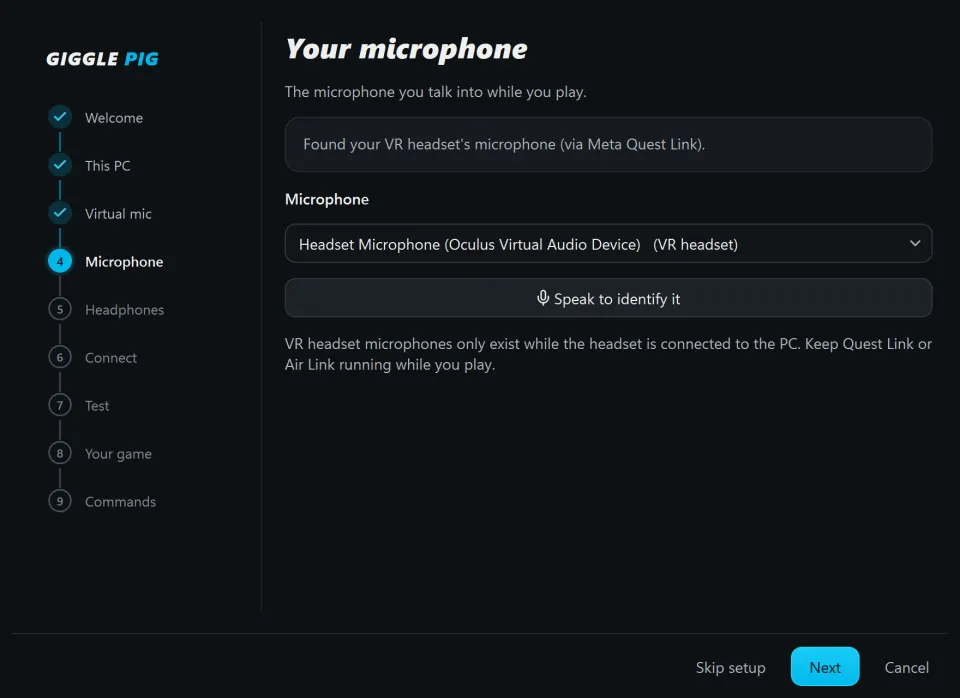
A VR voice changer that finds your headset mic over Quest Link, Air Link, Virtual Desktop and SteamVR, and your headphones follow it. In the headset, voice commands mean you never take it off to switch voices. At a desk, it works with any USB or headset mic.

PC VR only. Standalone Quest apps aren't supported.

Giggle Pig setup, microphone step: found your VR headset's microphone via Meta Quest Link

Guided setup

Set up in minutes. Checked, not guessed.

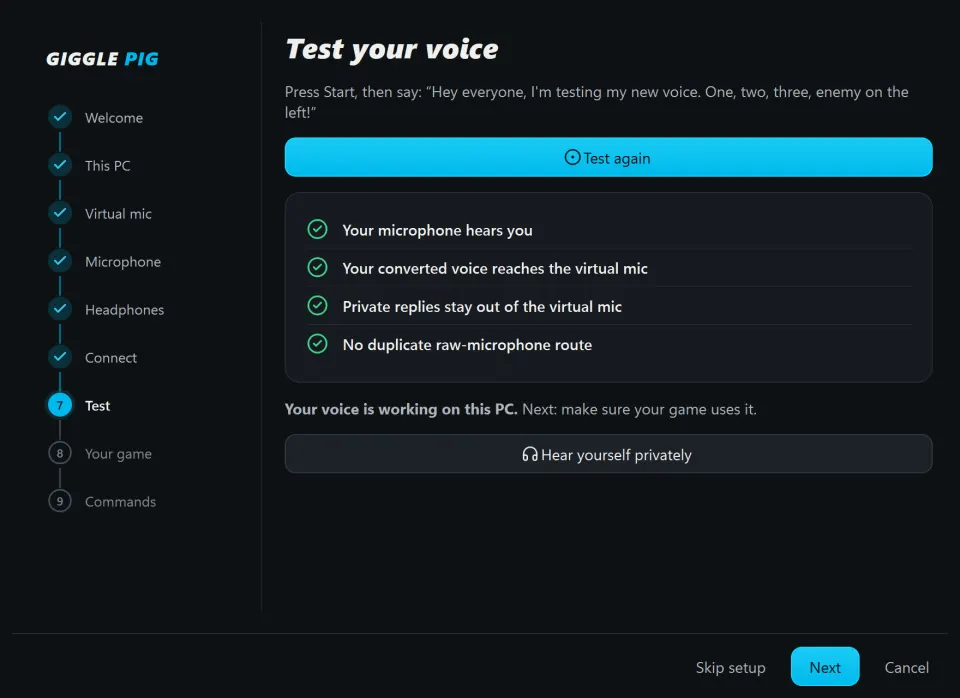
The setup wizard picks your mic, installs the free VB-CABLE virtual audio driver by VB-Audio, routes everything, then records a test to prove your game hears the converted voice. It shows the exact mic to pick in your game. Your original Windows sound settings come back when you quit.

Giggle Pig setup, test step: your microphone hears you and your converted voice reaches the virtual mic, all checks passed

Creator

Train your own voice. Share it with a link.

Make a voice nobody else has. Then hand it to your squad.

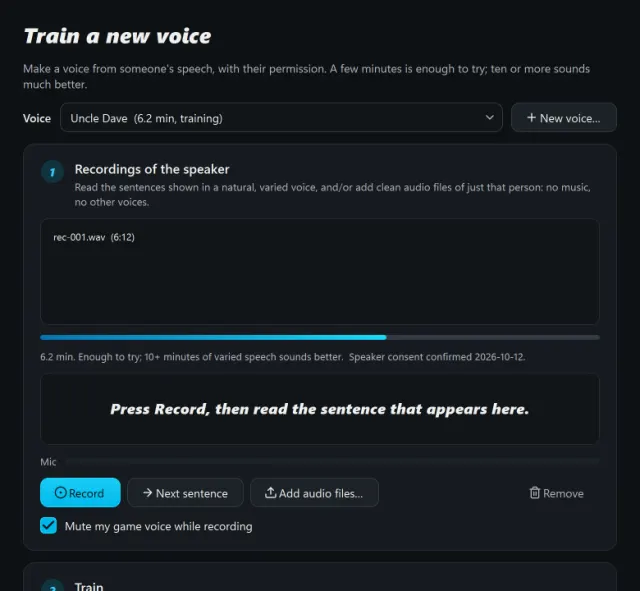
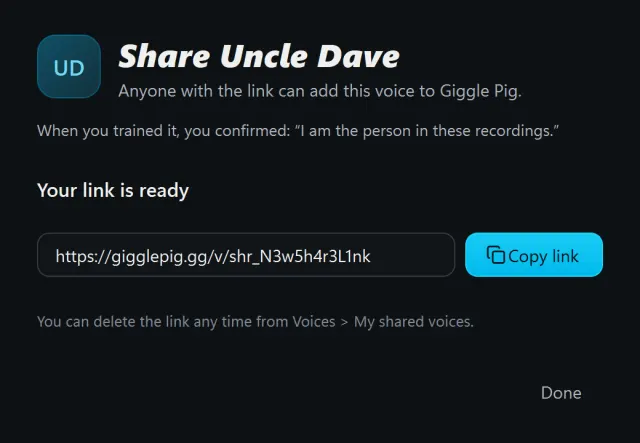
A character voice for your stream, your squad's running joke, a friend's voice (with their OK). On Creator, record a few minutes of speech (or add clean audio files) and train a custom voice right in the app. Share voices you've trained with a link your friends open in Giggle Pig. Consent is built in: Giggle Pig asks you to confirm the speaker agreed, and records it.

  • Train in the app; up to 25 custom voices
  • Share trained voices by link
  • AI-generated clips (text-to-speech and sound effects) Launching soon

Training needs an NVIDIA graphics card and a 3.6 GB extra download.

Giggle Pig voice training window: 6.2 minutes of recordings of the speaker, with consent confirmed, and Record and Add audio files buttons
Share dialog for a trained voice: your link is ready, with a Copy link button

Why Giggle Pig

Your voice stays home

Conversion happens on your PC. No audio uploads, no telemetry.

Works offline

Voices, effects, clips and offline commands work without internet or an account.

Always up to date

Updates install quietly when you close the app.

On the way for Pro

Twitch Coming soon

Let viewers swap your voice or fire clips with channel points, cheers, follows, subs, raids and chat commands.

OBS and Stream Deck control Coming soon

Switch voices and fire clips from your Stream Deck or OBS scenes.

Instant replay Coming soon

Save the last moment of comms in one press.

Smart soundboard Coming soon

Clip suggestions and automatic rules.

Local API and MCP Coming soon

Automate Giggle Pig from your own tools.

Planned for Pro. We'll announce each one when it ships.

Streaming today? The virtual mic works in OBS and Discord, and hotkeys and voice commands work mid-stream. Start on Free.

From download to "who is THAT?" in 3 steps

  1. Your micdesk, headset or VR
  2. Giggle Pigconverts on your PC
  3. Virtual micVB-CABLE
  4. Game / Discord / OBShears the new you
  1. Install.

    Download Giggle Pig and run the installer. The first launch downloads the voice engine (about 440 MB).

  2. Run setup.

    The wizard picks your mic, installs the free VB-CABLE driver, and tests that your game hears you.

  3. Play.

    Pick a voice, bind your clips and join the lobby. Switch with a hotkey or just say "Hey Giggle Pig".

Download free

Start free. Level up when you're ready.

Save up to 37% yearly
Start here

Free

$0 forever

No account needed

Everything you need to mess with your friends.

  • 5 voices: Male, Female, Robot, Demon, Chipmunk
  • 1 custom voice
  • 5 soundboard clips with hotkeys
  • Offline voice commands
  • 10 AI voice commands a month (free account)
Download free
For gamers

Pro

$7.99 per month, or $59.99 per year

Every voice and effect, no limits on clips.

  • All 18 voices and effects (13 classic effects)
  • 10 custom voices
  • Unlimited clips
  • Unlimited AI commands (fair use)
  • Twitch, OBS, Stream Deck, instant replay and more Coming soon
Get Pro
For creators

Creator

$14.99 per month, or $119.99 per year

Everything in Pro, plus your own voices.

  • Train voices in the app (NVIDIA GPU)
  • 25 custom voices
  • Share trained voices by link
  • AI-generated clips Launching soon
Get Creator

Paid plans are bought in the app. Install Giggle Pig, sign in with a code sent to your email, and upgrade from the account card. Billing is handled by Stripe.

What each plan includes
FeatureFreeProCreator
Real-time AI voice changingIncludedIncludedIncluded
Built-in voices and effects5Male, Female, Robot, Demon, ChipmunkAll 18All 18
Custom voices (import or shared link)11025
Soundboard clips with hotkeys5UnlimitedUnlimited
Offline voice commandsIncludedIncludedIncluded
AI voice commands10/monthfree accountUnlimited*Unlimited*
VR and desk mics, any game, Discord, OBSIncludedIncludedIncluded
Train voices in the app (NVIDIA GPU)Not includedNot includedIncluded
Share trained voices by linkNot includedNot includedIncluded
AI-generated clips (text-to-speech, sound effects)Not includedNot includedLaunching soon
Twitch integrationNot includedComing soonComing soon
OBS and Stream Deck controlNot includedComing soonComing soon
Instant replayNot includedComing soonComing soon
Smart soundboardNot includedComing soonComing soon
Local API and MCPNot includedComing soonComing soon

*Fair use applies.

Cancel any time from the app. If you downgrade, nothing is deleted: extra voices and clips lock until you upgrade again. Paid plans keep working offline for up to 30 days.

Prices in US dollars. Taxes may apply.

Questions

Is Giggle Pig really free?

Yes. The Free plan never expires and needs no account: 5 built-in voices, 1 custom voice, 5 soundboard clips and offline voice commands. Sign in with a free account to add 10 AI commands a month.

Why does Windows show a SmartScreen warning?

Our installer isn't code-signed yet; we're working on it. Until then Windows may show "Windows protected your PC". Click More info, then Run anyway. Only download Giggle Pig from gigglepig.gg. You can check the file against the SHA-256 on the download page.

What is VB-CABLE and why do I need it?

VB-CABLE is a free virtual audio driver from VB-Audio. It creates the virtual microphone your game or Discord listens to. Setup installs it with VB-Audio's official installer. Windows asks for permission, and you may need to restart once. It's the only part of setup that needs admin rights.

Will it work with my graphics card?

AI voices run on any DirectX 12 graphics card (NVIDIA, AMD or Intel), including most recent laptops. No compatible GPU? It falls back to your CPU; choose a smoother delay setting. Classic effects run on the CPU anyway. Training your own voice (Creator) needs an NVIDIA card.

Which games and apps does it work with?

Anything that uses a Windows microphone: PC games, Discord, Steam voice chat, OBS and more. Giggle Pig doesn't inject into games or touch their files. Select "CABLE Output" as your mic (setup does this for you) and you're in.

Does it work in VR?

Yes, with PC VR: Quest Link, Air Link, Virtual Desktop and SteamVR. Giggle Pig recognises your headset mic once the PC connection is up, and voice commands let you switch voices without taking the headset off. Standalone Quest apps that don't run on your PC aren't supported.

Is there any delay?

A little, like any real-time voice changer. The AI runs fast on your graphics card, but audio buffering adds a short delay. You can tune it: lower for snappier, higher for smoother AI voices.

Does my voice get uploaded anywhere?

No. Voice conversion and offline commands run entirely on your PC, and there's no telemetry. If you turn on AI commands (off by default), only the text of the command is sent to be understood, never your audio.

Can I use voices of real people?

Only with their permission. When you train a voice, Giggle Pig asks you to confirm the speaker agreed, and records it. Only voices trained in Giggle Pig can be shared by link. Don't use voices to impersonate or deceive anyone.

How do I upgrade, cancel or get updates?

Sign in inside the app with a code sent to your email (no passwords), then upgrade. Payment is handled by Stripe, and you can manage or cancel your subscription from the app any time. Paid plans keep working offline for up to 30 days. Updates install automatically when you close Giggle Pig.

What are the system requirements?

Windows 10 (22H2) or Windows 11, 64-bit; a microphone; about 1.5 GB of free disk space; and a DirectX 12 graphics card recommended for AI voices.

Your squad isn't ready for this.

Free for Windows 10 and 11. Set up in minutes.